
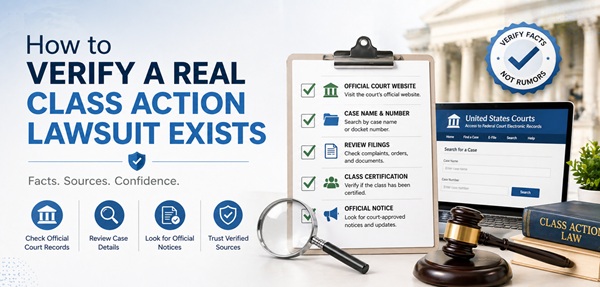

To verify a real class action lawsuit, search PACER (pacer.gov) for federal cases, check ClassAction.org and TopClassActions.com for verified case lists, look up the named settlement administrator, and confirm a specific case number and court. Real class actions never charge fees to participate or require Social Security numbers upfront.
Verifying a real class action lawsuit takes 5–10 minutes using free official tools. PACER’s Case Locator (pcl.uscourts.gov) indexes all federal cases. CourtListener offers free PACER access through the RECAP archive. Legitimate class actions always have a case number, named court, named plaintiffs, and an independent settlement administrator like JND, Epiq, or Angeion. If a website claims a settlement exists but cannot provide these details, or asks for fees to file a claim, it’s almost certainly a scam.
Online articles about class action lawsuits often blur the line between real cases and speculation. Some sites describe “law firm investigations” as “active lawsuits.” Others recycle Reddit posts as breaking legal news. Worst of all, scam sites pose as official settlement administrators to harvest your personal data. This guide gives you a step-by-step verification process to confirm whether a class action lawsuit is real before you share information, file a claim, or rely on any reported settlement details. Every method described here uses free, official, or court-verified sources — no fees, no guesswork, just actual court records.
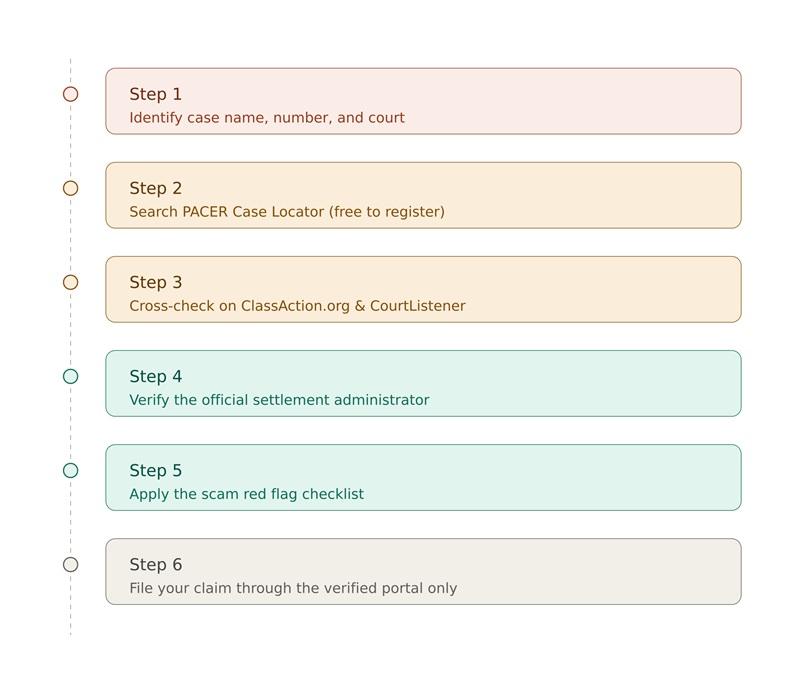
Visual Workflow: How to Verify Any Class Action
What a Real Class Action Looks Like (vs. a Rumor)
Before verifying, you need to know what you’re verifying. Real and rumored class actions look very different.
Five Markers of a Verified Class Action
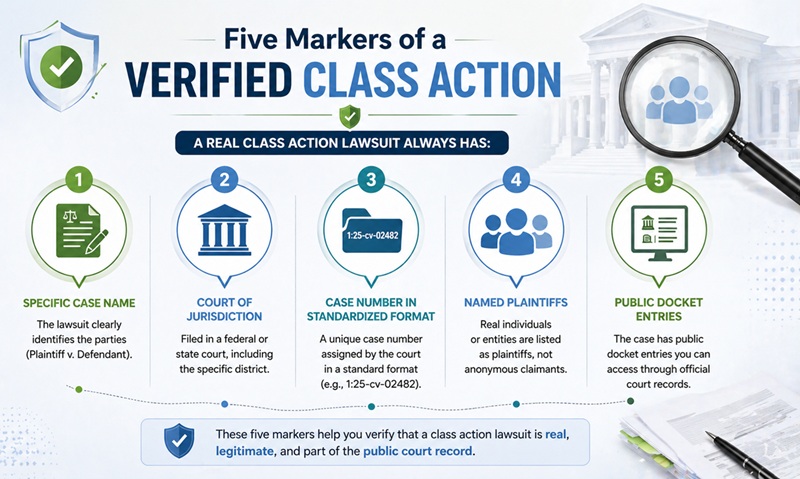
A real class action lawsuit always has:
- Specific case name (Plaintiff v. Defendant)
- Court of jurisdiction (federal or state, with district)
- Case number in standardized format (e.g., 1:25-cv-02482)
- Named plaintiffs (real people, not anonymous claimants)
- Public docket entries accessible through court records
Five Markers of a Fake or Premature Claim
These should make you suspicious:
- Vague references like “Mary Ruth Organics is being sued” with no case details
- Promises of specific dollar amounts (“$1,000 per person”) without court documents
- Articles citing only Reddit posts or other content websites as sources
- Claim sites that ask for fees, Social Security numbers, or banking details upfront
- Urgency tactics (“file before deadline expires”) without a real deadline
The basic rule: If a website claims a class action exists but can’t tell you the case number, court, and named plaintiffs, the claim is unverified.
Step 1: Gather the Case Information You Need
Before searching anywhere, identify what you’re looking for. The more specific your starting information, the easier verification becomes.
What You Need
| Information | Why It Matters |
|---|---|
| Defendant company name | Primary search term |
| Case name (if available) | Plaintiff v. Defendant format |
| Case number | Direct lookup on PACER |
| Court name | Narrows which database to check |
| Approximate filing date | Filters search results |
Where to Find Initial Case Details
If you’ve heard about a settlement from a news article, look for:
- The journalist or law firm cited
- Direct quotes from the complaint
- A specific court name
- The plaintiff’s law firm
If the article doesn’t include any of these, that’s already a sign to be cautious.
What to Do With Limited Information
If you only have the defendant company name:
- Use the PACER Case Locator to search nationwide
- Check ClassAction.org for any cases involving that company
- Look at the company’s own legal page (most public companies disclose pending litigation)
Step 2: Search PACER (The Official Federal Court System)
PACER (Public Access to Court Electronic Records) is the gold standard for verifying federal court cases.
What Is PACER?
PACER is the official federal judiciary system that provides electronic public access to over 1 billion federal court documents. Every federal civil case — including class actions filed in U.S. District Courts — appears on PACER.
How to Register (Free)
- Go to pacer.gov/register-account
- Choose “PACER – Case Search Only” account
- Provide name, address, and contact information
- Provide a credit card for fee billing (you only pay if usage exceeds the threshold)
- Receive your username and password
Registration is completely free. You only pay if you accrue charges.
PACER Costs (Most Users Pay Nothing)
| Action | Cost |
|---|---|
| Search results | $0.10 per page |
| Document access | $0.10 per page (capped at $3.00 per document) |
| Quarterly fee waiver | Fees waived if charges total ≤ $30 in a quarter |
| Practical reality | About 75% of PACER users pay no fee in any given quarter |
Using the PACER Case Locator
The PACER Case Locator (pcl.uscourts.gov) is a nationwide index for federal cases.
Step-by-step:
- Log in with your PACER credentials
- Select “Case Locator”
- Choose case type (Civil for class actions)
- Enter the defendant’s company name
- Optionally narrow by court region or date range
- Click “Search”
The results show: party name, court where filed, case number, date filed, and date closed.
When to Use PACER vs. Specific Court Sites
- PACER Case Locator — when you don’t know the court
- Specific court CM/ECF — when you know the court (faster, real-time)
- PACER Service Center — call (800) 676-6856, M-F 7am–6pm CT for help
Step 3: Use Free Alternatives to PACER
If you’d rather not register for PACER, free alternatives exist.
CourtListener and the RECAP Archive
CourtListener.com (run by the nonprofit Free Law Project) hosts the RECAP Archive — millions of PACER documents made publicly searchable for free.
How RECAP Works:
- Volunteers using a browser extension contribute documents downloaded from PACER
- Documents become free for everyone via CourtListener
- Includes most major class actions
- Searchable by company name, case name, or topic
Free alternative usage:
- Visit courtlistener.com/recap
- Search the company name
- Browse case dockets free
- Download contributed documents free
Other Free Verification Sources
| Source | What It Offers |
|---|---|
| ClassAction.org | Verified active and recent class actions |
| TopClassActions.com | Settlement notices and class action news |
| JND Legal Administration | Active settlements they administer |
| Epiq Class Action | Active settlements they administer |
| Angeion Group | Active settlements they administer |
| State court records | Free access in most states’ online portals |
Step 4: Verify the Settlement Administrator
If a website claims an active settlement exists, the settlement administrator is the most direct verification path.
What Is a Settlement Administrator?
A settlement administrator is a court-approved third-party company that manages claim processing for class action settlements. Major administrators include:
- JND Legal Administration
- Epiq Class Action
- Angeion Group
- A.B. Data
- KCC (Computershare)
- Postlethwaite & Netterville (P&N)
How to Verify an Administrator
- Check the administrator’s website directly — every legitimate firm lists active cases
- Look for the firm’s name in court orders (visible on PACER)
- Verify the settlement website domain — usually includes the administrator’s name or the case name
- Cross-reference with court documents through PACER
Red Flags in Settlement Sites
A real settlement administrator’s site will have:
- Clear company name and contact info
- Court-approved domain (often ending in the case name)
- FAQ section with case details
- Official court order linked or quoted
- Contact information including phone, email, and physical address
A scam settlement site often has:
- Generic domain like “claim-now-2026.com”
- No administrator company name
- Contact info limited to a generic email
- Demands for upfront fees
- Requests for excessive personal data
Step 5: Apply the Scam Red Flag Checklist
Even after verifying the case is real, the claim site itself could be fake. Use this checklist before submitting any information.
Critical Red Flags
| Red Flag | What It Means |
|---|---|
| Asks for upfront fees | Real claims are always free |
| Requires Social Security number before basic verification | SSN should only be requested after court-approved screening |
| Promises specific dollar amounts | Real settlements rarely guarantee individual amounts |
| Uses urgency tactics | “Apply in next 24 hours!” is rarely legitimate |
| No court case number listed | Cannot be a real settlement |
| No settlement administrator named | Cannot be a real settlement |
| Cannot be cross-referenced with PACER or ClassAction.org | Likely fabricated |
| Generic email-only contact | Real administrators have phone and address |
| URLs hosted on free domains | Real settlements get court-approved domains |
What Real Settlements Actually Pay
Setting realistic expectations helps spot scams:
- No-receipt claims: typically $5–$50 flat refund
- With-receipt claims: $20–$300 depending on documented purchases
- Severe injury or hospitalization claims: $500–$10,000+ with documentation
- Per-household caps are typical
- Most TCPA cases: $300–$900 average payout
If a claim site promises “up to $1,500” or “$1,000 guaranteed,” it’s likely either fake or speculating wildly.
Step 6: How to File a Real Claim Safely
Once you’ve verified everything, filing a claim is straightforward.
What You’ll Need
- The official settlement website (verified through court records)
- Your personal information (name, address, contact)
- Phone number that received calls (for TCPA cases)
- Receipts or proof of purchase (if available — most settlements allow no-receipt claims at lower tiers)
- Your chosen payment method (check, direct deposit, PayPal, etc.)
Step-by-Step Filing
- Type the URL directly — don’t click email links from unknown senders
- Verify the SSL certificate is valid (lock icon in browser)
- Read the case details — confirm they match what you’ve verified
- Choose your tier based on documentation
- Fill out the form completely but never share unnecessary information
- Save your confirmation number
- Note the deadline in your calendar
- Watch for follow-up communication through the claim portal
What Real Notification Looks Like
Real class action notifications come from court-approved administrators:
- Direct mail with court order details
- Email from a legitimate administrator domain
- Newspaper publication for large class actions
- Social media announcements through verified accounts of major firms
Pro tip: If you receive an “official” class action notification email, look at the actual sender domain (not the display name). Scammers often spoof the display name but can’t fake the actual sending domain.
Common Misconceptions About Class Actions
Even verified class actions are often misunderstood. Here are the most common confusions.
“I Need to Sign Up to Be Included”
False. In most certified class actions, you’re automatically a class member if you meet the criteria. You only need to opt out if you want to pursue your own separate case. The opposite — opting in — is rare in U.S. class actions.
“The Lawsuit Means the Company Is Guilty”
False. A filed lawsuit is just a complaint, not a verdict. Even after class certification, no liability has been established. Most class actions resolve through settlements where the defendant does not admit liability.
“Settlements Always Pay Big Amounts”
Usually False. While some settlements distribute millions (WEN by Chaz Dean = $26 million; Suave Keratin = $10.2 million), individual payouts are typically much smaller. After legal fees and large class sizes, individual payments often range from $5–$300.
“I Can Pay Someone to Help Me File”
Don’t. Legitimate class actions never require you to pay a third party. Settlement administrators handle filing for free. Anyone charging fees to “help you file” is either unnecessary or a scam.
Specific Scenarios: How to Verify Common Searches
Here’s how to apply this process to specific lawsuit searches.
Verifying a Lawsuit Against a Pharmaceutical Brand
- Search PACER Case Locator for the brand name
- Check DrugWatch.com for active product liability cases
- Look at the manufacturer’s 10-K filing (public companies disclose litigation)
- Search FDA MedWatch for adverse event reports
- Look for the case at the Multi-District Litigation website (jpml.uscourts.gov)
Verifying a Lawsuit Against a Cosmetics Brand
- Check PACER for federal cases
- Search ClassAction.org by brand name
- Look at the brand’s parent company website’s investor relations page
- Search Hagens Berman and other major plaintiff firm case pages
- Cross-reference any settlement amounts with verified news sources
Verifying a TCPA Robocall Lawsuit
- Search the company name on TopClassActions.com
- Check National Consumer Law Center (NCLC) TCPA case tracker
- Verify case details on PACER
- Confirm settlement administrator if applicable
For an example of how online rumors can outpace real legal action, see our detailed analysis: Mary Ruth Organics Lawsuit: Verified Facts vs. Online Rumors — a case study in distinguishing law firm investigations from filed lawsuits.
Verifying a Bank or Financial Services Lawsuit
- Search PACER federal courts
- Check the Consumer Financial Protection Bureau (CFPB) complaint database
- Look at the bank’s public regulatory filings
- Verify with the state attorney general’s consumer protection division
Free Tools and Resources Reference
Bookmark these official resources for ongoing class action verification.
Federal Court Records
| Resource | URL | What It Offers |
|---|---|---|
| PACER Case Locator | pcl.uscourts.gov | Nationwide federal case index |
| PACER Find a Case | pacer.uscourts.gov/find-case | Direct case search |
| CourtListener | courtlistener.com | Free PACER alternative |
| RECAP Archive | courtlistener.com/recap | Free PACER documents |
Class Action Aggregators
| Resource | URL | What It Offers |
|---|---|---|
| ClassAction.org | classaction.org | Verified active cases |
| TopClassActions.com | topclassactions.com | Settlement notices |
| JPML (MDL site) | jpml.uscourts.gov | Multi-district litigation |
Settlement Administrators (Verify Active Cases)
| Administrator | Website |
|---|---|
| JND Legal Administration | jndla.com |
| Epiq Class Action | epiqglobal.com |
| Angeion Group | angeiongroup.com |
| A.B. Data | abdataclassaction.com |
Consumer Protection Authorities
| Agency | What It Tracks |
|---|---|
| FTC | Federal consumer protection complaints |
| CFPB | Financial services complaints |
| FDA | Medical and food product issues |
| State Attorney General | State-specific consumer complaints |
When to Hire an Attorney Instead
Class actions aren’t always the best path for serious harm.
When an Individual Lawsuit Makes More Sense
- You suffered significant individual harm (medical bills, severe injury)
- The class action settlement amount is unfair to your situation
- You want to opt out of the class and pursue larger damages
- The class action excludes your specific claim type
- You need personalized legal strategy
How to Find a Good Attorney
- State bar association referral services — most are free
- Avvo, Martindale-Hubbell, and similar directories — peer ratings
- Specific specialty firms — TCPA, product liability, FCRA specialists
- Free initial consultations — most consumer attorneys offer them
- Contingency arrangements — most don’t charge upfront
Questions to Ask an Attorney
- Have you handled similar cases?
- What’s your fee structure?
- Are you a member of class action plaintiff bar organizations?
- What’s the timeline for my type of case?
- Should I opt out of any active class actions?
FAQs
1. How do I check if a class action lawsuit is real?
Search the PACER Case Locator at pcl.uscourts.gov for federal cases, or use the free CourtListener.com alternative. Cross-reference at ClassAction.org and TopClassActions.com. A real class action always has a specific case number, named court, named plaintiffs, and (if settled) a court-approved settlement administrator. Unverified claims should be treated with skepticism.
2. Does PACER cost money to use?
PACER charges $0.10 per page with a $3.00 cap per document, but fees are waived if your quarterly charges total $30 or less. About 75% of PACER users pay no fee in any given quarter. Registration is completely free. CourtListener offers a free alternative through the RECAP Archive of PACER documents.
3. Why do so many websites describe lawsuits that don’t exist?
Many SEO-driven content websites confuse law firm “investigations” with “active lawsuits” to capture search traffic. A law firm investigation collects potential plaintiff stories before deciding whether to file. Articles describing these as ongoing litigation are technically inaccurate. Always verify through PACER or court-approved settlement administrators rather than relying on aggregator sites.
4. How can I tell if a settlement claim website is a scam?
Scam settlement sites typically: ask for upfront fees (real claims are always free), request Social Security numbers before basic verification, promise specific dollar amounts, use urgency tactics, lack a court case number, can’t be cross-referenced on PACER, or have generic email-only contact. Real administrators have phone numbers, physical addresses, and court-approved domains.
5. Do I have to sign up to be included in a class action?
In most certified U.S. class actions, you’re automatically a class member if you meet the criteria — no signup required. You only need to opt out if you want to pursue an individual case. Filing a claim form is required to receive payment, but you remain a class member regardless. Read settlement notices carefully for specific requirements.
6. What does a real class action settlement notification look like?
Real notifications come from court-approved administrators via direct mail, email from legitimate administrator domains, newspaper publication, or verified social media accounts. They include: case name, court, case number, deadline, claim instructions, and contact information. Scrutinize sender domains carefully — scammers spoof display names but can’t fake actual sending domains.
7. Can I trust class action news on social media?
Be skeptical. Social media often misrepresents law firm investigations as filed lawsuits, exaggerates settlement amounts, and accelerates misinformation. Always verify through official sources before sharing or relying on viral class action posts. The June 2025 “$14 million Credit One Bank settlement” reports — flagged by The National Law Review as a possible “phantom settlement” — illustrate how social media can outpace verified facts.
Key Takeaways
- PACER (pacer.gov) is the official source for verifying any federal class action — registration is free, and most users pay no fees
- CourtListener.com and the RECAP Archive offer a completely free PACER alternative
- A real class action always has a specific case number, named court, and named plaintiffs
- ClassAction.org and TopClassActions.com maintain verified case lists
- Court-approved settlement administrators (JND, Epiq, Angeion) are the only legitimate claim portals
- Real class actions never charge fees to participate or file claims
- Beware websites that describe law firm investigations as filed lawsuits — they are often premature or speculative
